

Managing physical keys and shared door codes becomes harder as employees, contractors, and access needs change. A commercial access control system gives you a more flexible way to decide who can enter specific areas and when.
When access permissions are difficult to update, former employees or outdated credentials may retain access longer than intended. Electronic access control makes those permissions easier to manage.
It also creates useful entry records and simplifies daily administration. In this guide, we will walk you through what a commercial access control system actually does, how it works, and where it delivers the most value for both safety and daily operations.
Ready to get started? Let’s get started.
What Is a Commercial Access Control System?
A commercial access control system electronically controls who can enter a building or restricted space after checking an approved credential. NIST (National Institute of Standards and Technology) describes a physical access control system as an electronic system that authenticates and authorizes people or vehicles at protected access points.
That credential might be a card, fob, PIN, smartphone, or biometric identifier. The business then sets the rules behind it, including which doors a person can use and during which hours.
How Commercial Access Control Systems Work
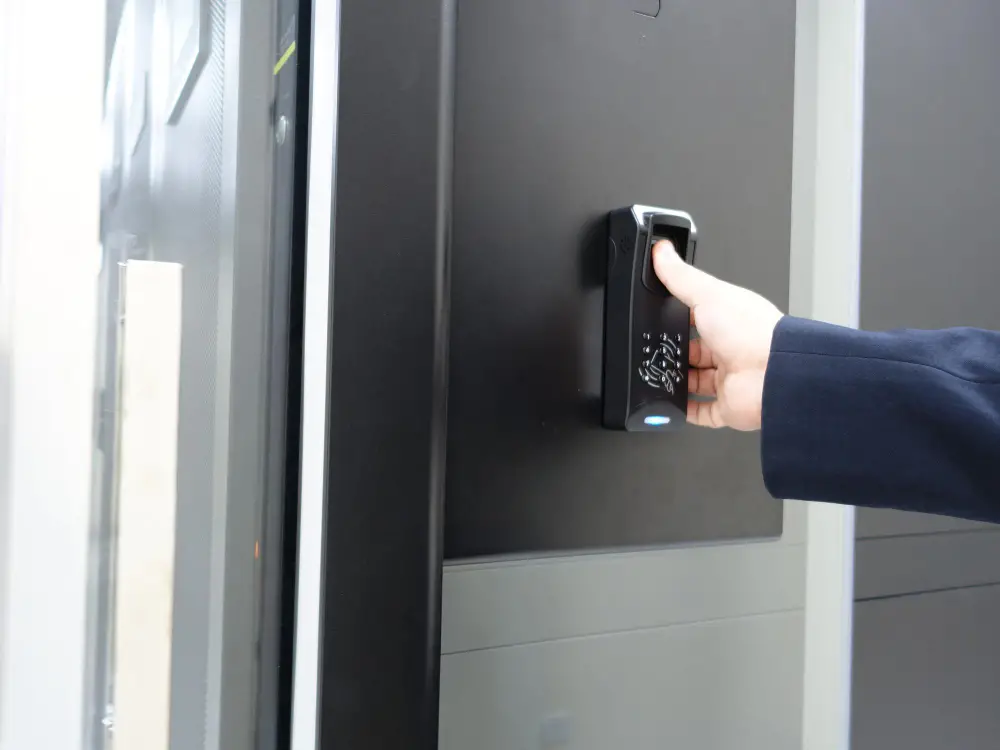
Every access control system is built from a handful of core parts working together. Most systems combine credentials, readers, controllers, electronic locking hardware, and management software. The software holds the permissions that determine whether someone gets through.
When someone presents a credential at a controlled entrance, the system checks whether they have permission to enter. A typical access request works like this:
- The user presents a credential to the reader.
- The reader sends the credential data to the control panel.
- The panel checks the credential against the permission list.
- The panel grants or denies access in real time.
- The system logs the attempt, whether approved or denied.
How Access Control Systems Improve Workplace Safety
A commercial access control system makes the entry decision deliberate and traceable for businesses, and that is the basic security need of any company. Access control helps businesses manage a fundamental physical security question: who should be allowed into a building or restricted area, and under what conditions?
By combining access control and security systems like alarms and cameras, companies can better control who enters the workplace. That added layer of security improves overall protection of employees and visitors in the following practical ways:
1. Prevent Unauthorized Access to the Workplace
Employee entrances, exterior doors, and other controlled entry points require a reliable way to distinguish authorized people from those who should not have access.
An access control system helps restrict entry to people with approved credentials and permissions. Physical keys get copied, lost, or handed off without anyone knowing, and there is no way to prove who used them or when.
Electronic credentials give administrators more control when access needs change. For example, they can disable a lost card or remove an employee’s permissions without rekeying every affected door. If a card is lost, a business can deactivate it in minutes instead of rekeying every door in the building.
2. Restrict Sensitive and High-Risk Areas
Getting through the front door does not have to give someone access to the whole building.
Different workplaces have very different restricted areas. A warehouse might protect high-value inventory cages. Healthcare facilities can limit medication storage. Offices may keep server rooms available only to IT personnel. In manufacturing facilities, certain employees may need controlled access to machinery or other higher-risk zones.
A business can give employees access only to the areas they need for their work. That becomes difficult with traditional keys, especially across larger properties. Electronic access allows a company to divide one building into separate access zones and decide exactly which employees can enter each one.
3. Create an Audit Trail of Entry and Exit Activity
After a security incident, one of the first questions is usually simple: who accessed the area?
Electronic records can help answer it. Depending on the system configuration, an access log may show:
- The credential used at a door
- The date and time of the attempt
- The controlled entrance involved
- Whether the system approved or denied access
These records become particularly useful when paired with other security information. If inventory disappears from a controlled room, for example, a security manager can review relevant door activity and then check surveillance footage from the same period.
4. Manage Visitors, Contractors, and Temporary Access
Visitors, delivery drivers, and short-term contractors create a different kind of risk, since they need to get through certain doors without holding a permanent credential. Access control systems handle these situations with temporary credentials that expire automatically.
For example, a business could give an HVAC technician temporary access to a mechanical room during a scheduled service window. Once that period ends, the credential can expire without the business needing to hand over a permanent key. So, there was no need to hand over a physical key or provide ongoing access.
5. Respond Faster to Security Incidents and Emergencies
Good incident response depends on clear information. Access control can help security personnel see where an unusual entry attempt occurred and identify the credential involved.
When businesses connect access control with cameras, alarms, and professional monitoring, teams can review more context around an event. For example, a denied credential at a rear entrance can direct staff to the correct camera view much faster.
Elite Security Alarm Systems already uses this integrated approach across its commercial security solutions, where alarms, video surveillance, monitoring, and other security functions can work together.
6. Reduce Risks From Lost, Stolen, or Copied Keys
Traditional keys create an awkward security problem. Once a key disappears, a business may have no reliable way to know who has it.
Electronic credentials give administrators more control.
A business can:
- Deactivate a lost card or fob
- Issue a replacement credential
- Remove permissions when employment ends
- Change access without replacing a door lock
That flexibility becomes especially useful in businesses with frequent staffing changes or many controlled doors.
How Access Control Systems Make Daily Operations More Efficient

While safety is the most valuable feature of a commercial access control system, it also removes several small administrative headaches. Whether it is key tracking, employee replacement, or temporary entry, it cuts down on the small daily tasks that eat up a manager’s time. Here is how it improves the overall workplace efficiency:
Automating Entry and Reducing Administrative Workload
With physical key management, someone has to issue keys, keep track of them, collect them when employees leave, arrange replacements, and decide what to do when a key disappears.
Electronic access moves much of that work into software. An administrator can issue a credential, change its permissions, or disable it without altering every affected door.
That single change removes hours of administrative work that used to fall on office managers or facilities staff every month.
Role-Based and Time-Based Access Permissions
Access control systems let a business set permissions by role and by time, not just by person.
A cleaning crew might get access only between 6 and 8 in the morning, while warehouse staff get access only on weekdays.
This level of detail stops a security system from becoming an all-or-nothing setup where everyone either has full building access or none at all.
When several employees perform similar jobs, administrators can manage them under appropriate permission groups.
Remote and Mobile Management for Distributed Teams
Security administration gets harder when the person responsible for access is somewhere else.
For example, an employee might leave unexpectedly. Similarly, a contractor may arrive after the property manager has gone home, or a suspicious entry attempt could need review.
A cloud-connected commercial security access control system can give authorized managers access to security controls from outside the property. That may prove useful for businesses with several branches, facilities that run late, or managers who regularly move between sites.
Streamlined Visitor, Vendor, and Contractor Access
Another way a corporate access control system improves workplace efficiency is by streamlining access for visitors, vendors, and contractors.
For instance, let’s suppose that a cleaning crew works after closing, and a delivery company uses a service entrance every Tuesday. Without a structured access process, each visit can create another small job for reception or management.
A digital system issues a temporary credential in seconds, tied to a specific date and area of the building. For vendors who are on a regular schedule, such as a cleaning company or an HVAC contractor, you can use a recurring credential instead of checking in as a stranger each time.
Supporting Regulatory Compliance
Some industries have regulations that require more control over physical spaces, information, equipment or records. For instance, NIST guidance for organizations that handle controlled unclassified information calls for authorized access lists, credentials, access reviews, physical entry controls, audit logs and visitor controls.
Access control can assist organizations in meeting those requirements by helping to manage authorized users and retain access activity where applicable.
Which Access Control Methods Work Best for Different Business Needs?
Not every business requires the same access method. We recommend selecting the appropriate method for your budget, building size, and the level of security a particular door requires.
But here is a general overview of what type of access control might be the right choice for various organizations:
Key Cards and Fobs
Key cards and fobs are one of the most common access methods for offices and retail spaces, primarily because they are inexpensive and easy to use for staff.
A card can be deactivated instantly if lost, unlike a metal key. The tradeoff is that a card can be shared or lent out, so it works best when paired with a clear policy against sharing credentials.
PIN & Keypad Access
Keypad access uses a numeric code instead of an actual item, so there’s no chance of losing a card at all.
This method works well for smaller buildings or doors requiring only single entry, such as a back office or storage closet. PINs can be shared or observed, so businesses should consider the sensitivity of the area and whether an additional authentication method is appropriate.
Mobile Credentials and Smartphone Access
Mobile Credentials and Smartphone Access Mobile credentials use an app or a digital wallet pass to turn an employee’s phone into their access card.
Since most people carry around their phones, there is not a separate item to lose or forget. It also allows a company to send or revoke credentials remotely, which is useful for companies that have multiple locations or high employee turnover.
Biometric Access Control
Biometric access control uses a fingerprint, facial scan, or retina scan to confirm identity. Unlike a card or fob, there is no separate physical credential for the employee to carry. It fits high-security areas such as server rooms, pharmacies, or cash-handling offices. The higher upfront cost usually means businesses reserve it for the doors that carry the most risk.
How Different Workplaces Can Use Access Control
Access priorities change dramatically from one property to another. An office may focus on employee entrances and server rooms, while a warehouse has loading docks and inventory areas to control. The table below shows how common facilities can apply access control in practical ways.
| Workplace | How Access Control Can Be Used | Main Benefit |
| Offices | Control employee entrances, executive areas, file rooms, and IT spaces | Keeps internal areas available to appropriate staff |
| Schools | Manage staff entrances, administrative offices, equipment rooms, and controlled building areas | Creates clearer separation between public and restricted spaces |
| Healthcare Facilities | Restrict medication storage, records areas, staff rooms, and sensitive clinical spaces | Helps protect controlled areas and sensitive resources |
| Retail Stores | Control stockrooms, cash offices, employee entrances, and receiving areas | Adds protection around inventory and back-of-house spaces |
| Restaurants | Manage offices, storage areas, employee entrances, and other staff-only spaces | Keeps public and employee areas more clearly separated |
| Warehouses | Restrict inventory cages, loading areas, equipment rooms, and after-hours entry | Gives managers more control across large facilities |
| Multi-tenant Buildings | Separate tenant spaces from shared entrances and service areas | Allows individual access rules for different tenant groups |
| Manufacturing Sites | Limit machinery areas, control rooms, laboratories, and other restricted zones | Helps keep unauthorized personnel away from controlled work areas |
The Final Words
In short, an access control system gives you greater control over who enters your workplace or any specific or restricted areas. At the same time, access control systems can reduce administrative headaches and improve overall efficiency by cutting manual work and physical hassles.
If you are planning to integrate an advanced access control system into your existing security infrastructure, Elite Security Alarm Systems is here to help. We have served South Florida since 1997 and build commercial security systems around each property’s actual security requirements and budget.
Our team can manage access control alongside video surveillance, alarms, automation, fire and life safety technology, and 24/7 professional monitoring. So, get a free quote today and discuss an access control setup designed around the way your workplace operates.
FAQs
What types of corporate access control systems are available?
Businesses typically choose between key cards, PIN keypads, mobile credentials, and biometric scans such as fingerprint or facial recognition. Many companies combine two methods, for example, a card reader at the main door and a keypad in a server room.
Do access control and security systems work together?
Access control works well alongside video monitoring, alarm systems, and fire and life safety equipment, since a locked door alone cannot detect a fire or catch an intruder coming through a window. Pairing these systems together gives a business a complete view of the property.
How much does a workplace access control system cost?
An average workplace access control system costs between $1,500 and $3,500 per door for a complete, professionally installed mid-range setup. However, the exact pricing depends on the number of doors, the type of credential chosen, and whether the business needs video integration or remote management.